Showing posts with label Feedback. Show all posts

Monday, 13 February 2012

Mailvu


What is Mailvu?What does it do?


Mailvu is a total free and handy tool to send video email just like sending normal ones. The time limit is 10 minutes. This process includes three steps and they are making the webcam ready for recording,clicking to start record and sending it to different email adresses including yours.Besides, if you sign for the free account, you can enjoy some options to edit your video before sending it.


Why is this particular tool or technology relevant to language learning? What approaches to languague learning or research underpin the use of this technology?


This digital tool can be well applied into practicing speaking in Enlish teaching. It is generally acknowledged that speaking ability is comparatively the weakest skill amang the four language skills. In China, students mainly foucus on listening, reading as well as writing rather than speaking under the national education system. But this technology can alter the traditional ways of homeworks as well as the way of submitting the them.


How you might use it to foster language learning in class/outside class?


This tool can be used for the after-class assignment based on developing speakig. Teachers can ask students to record their speeches or work in pairs to produce something together and send these to teachers. Teachers can also send their feedbacks via mailvu.


The advantages of Mailvu:
. Teachers can record a video and send this directly to students as feedbacks.
. Students can also record their speeches or prononciations and send these to their teachers.
. This kind of video email can save both students and teachers time to interact with each other.


Limitations:
. The length of this recording is only 10 minutes.
. Students may lose their interest on speaking to a machine after several times if no stimulating activities are involved.
. The process of handing homework and waiting for teacher's feedback has time delay problem.

Sunday, 12 February 2012

Jing

Link to Jing Download

What is Jing? What does it work?

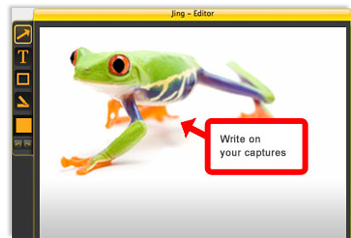
Jing is a very useful screen-capture tool with lovely interface. This tool can make it easy and simple to share your screen. All you need to do is click one button and record it. Once the video is finished, it can be shared or sent via emails.

How to use Jing?


Why is this particular tool or technology relavant to language learning? What approaches to language learning or research underpin the use of this technology?

Jing can be both used by the teachers and students. As for the teachers, teachers can easily give vivid feedbacks to their students with sharing their screen. They can marking their homework online and highlight the mistakes and explain in detail. Students can understand better with watching the whole process and make them feel like their teacher is right in front of him. However, in the traditional ways of giving feedbacks, students just see the result and probably don't know how to correct their homework. Jing has overcome this difficulty and creat this platform for bettering their after-class academic interactions.

How might you use it to foster language learning in class/outside class?

Jing can be used in language teaching in various ways. As for the teachers, they can use it in the following ways:
  • Teacher can do some Jings about preclass warm-up activities like introducing some new words and how to pronounce and use them.
  • Teacher can show students how to do some academic research online before or after class to enrich their knowledge with providing them some websites and keywords.
  • Teacher can give feedbacks in a more attractive way to stimulate learner's autonomy and encourage them to make use of the digital tools to improve their learning.

The advantages of Jing:

  • By using Jing, teachers can give personal feedback to students with corrections or suggestions on their homework efficiently.
  • Teachers can make this video with their voice to show the students their computer screen and explain more explicitly than traditional feedbacks.
  • The interface is user-friendly and easy to use.
Limitations:
. The free version can only video five minutes.

Thursday, 26 January 2012

Self Introduction

What is it? What does it do?

My brainshark is kind of software that can add sound easily into different kinds of file such as powerpoint presentation, document, PDF etc.


Why is this particular tool or technology relevant to language learning? What approaches to language learning or research underpin the use of this technology?

In the four interrelated skills, speaking is becoming increasingly significant in current world. Generally speaking, speaking is an ability based on the other three skills and a quite number of students are afraid of speaking English in the public because they worry about making mistakes. This obstacle is a big barrier for language learners and in this case attractive learner-centered speaking tool need to be come up with. Mybrainshark is one of them. This tool can be used to practice students speaking and get them another stimulating way of speaking.


How you might use it to foster language learning in class/outside class?

There are numerous ways of using mybrainshark on ELT. As for the language trainers, they can use it in all the three phases of teaching like pre-class, in-class as well as after-class activities. They can make the PPT and add their voice into each page correspondingly about the teaching material, homework etc. Similarly, students can make presentation with sound to practice their speaking. For instance, making a self-introduction PPT and could let the audience know more vividly with their vocal narration. The following one is my self-introduction with using my brainshark. Please feel free to comment on it.


Limitations of mybrainshark:

  • Some hardware equipments requirements for using mybrainshark like the quality of the microphone and good connection with the Internet.

Friday, 20 January 2012

Todays Meet

An Great Platform for the Online Group Discussion
What is it? What does it do?

Todays Meet is a convenient online website for posting different kinds of ideas in a online room which can be simply built. This website is extremely suitable for the group discussion in class.

Why is this particular toolor technology relevant to language learning? What approaches to language learning or research underpin the use of this technology?

In a classroom, teahers always try to encourage students to speak out their own thoughts. However, owing to the limited time, only a few can get the chances to express their ideas. Todays Meet can make everyone in class have the opportunity to convey what's in their minds on Todays Meet. Additionally, for those who don't have the courage to deliver their opinions in  front of people, this is also an absolutly great tool to them. Most importantly, via this tool, the organiser can get all the messsages from all participants without missing any.

How might you use it to foster language learning in class/outside class?

The biggest advantage of it is it's so simple to use. Just name your room, set the time for deleting the room and yolur room is ready to use. All participants only need to enter the built room and they are free to post their ideas out there. I prefer to use it within the class in the purpose of encouraging all of them to have their own thoughts expressed freely.

Limitations:
  •  Limits of 140 characters of each comment.
  •  Todays Meet have the only function of posting messages.